Microsoft Clarity is no longer just a free heatmap tool. Across 2025 and 2026, Microsoft shipped an AI layer that turns the platform into something marketers never had before: a free way to see whether AI systems crawl, cite, and send traffic to their content. The timing is not accidental. Ahrefs’ December 2025 update, an analysis of 300,000 keywords, found that pages with an AI overview above them get a 58% lower click-through rate than matched keywords without one.
That shift is why behavioral analytics and AI visibility tracking moved from a nice-to-have to an essential. Before the AI features, a quick grounding: here is what Microsoft Clarity is and why it earns its place in a marketer’s stack. Then we ask the sharper question, do Clarity’s newer AI features actually move the needle on SEO, AEO, and GEO rankings?
What Is Microsoft Clarity?
Microsoft Clarity is a free behavioral analytics tool from Microsoft that shows you what visitors actually do on your website. Where Google Analytics reports that a page got 5,000 sessions and a 2.1% conversion rate, Clarity shows the why behind those numbers: heatmaps of where people click, scroll maps of how far they read, and session recordings that replay individual visits.
The tool launched in 2020 and has stayed free ever since, with no paid tier and no traffic caps. Setup is a single tracking code added to your site, after which Clarity records heatmaps, click maps, scroll maps, and session recordings for every visitor. It is built to work alongside, not replace, Google Analytics: GA4 measures acquisition, attribution, and conversions, while Clarity reveals the friction that makes people leave before converting.
| Question it answers | Google Analytics 4 | Microsoft Clarity |
| What happened? | Acquisition, attribution, conversions | Heatmaps, scroll maps, session recordings |
| Why did it happen? | Partial (funnels, events) | Friction signals: rage clicks, dead clicks, JS errors |
| Who is reading me now? | Not covered | AI Bot Activity, Citations, Topic Insights |
| Best use | Reporting and attribution | UX diagnosis and AI-visibility tracking |
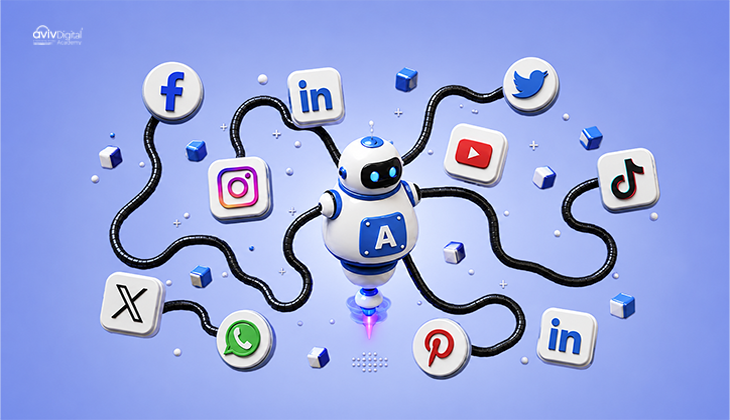
What makes Clarity worth a second look in 2026 is the AI layer Microsoft has shipped on top of that free foundation. Copilot session summaries, AI bot activity, citations, and topic insights extend the tool from “Where do people click?” to “Which AI systems crawl, cite, and recommend my content?”
Benefits of Microsoft Clarity
The headline benefit is the price: Clarity is free forever, with no traffic limits and no feature paywalls. That makes it the default starting point for behavioral analytics, especially when paid alternatives cap sessions on their lower tiers.
The practical benefits go beyond cost:
- A complete behavioral picture. Heatmaps, scroll maps, click maps, and session recordings sit in one dashboard, so you can move from “this page bounces” to “this specific button is being rage-clicked” without switching tools.
- No traffic caps. Low-traffic and long-tail pages still accumulate usable data instead of disappearing into a sampled average, which matters when you are diagnosing a single underperforming page.
- Faster UX fixes. Copilot session summaries surface rage clicks, dead clicks, and JavaScript errors in seconds, shrinking the time between noticing a problem and fixing it.
- AI visibility tracking. AI Bot Activity, Citations, and Topic Insights answer questions no free tool answered before: which answer engines crawl you, whether they cite you, and which competitors get cited instead.
- Privacy by design. Clarity automatically masks sensitive data in recordings and is built with GDPR compliance in mind, so session analytics do not expose customer details.
- Google Analytics integration. Clarity links with GA4, so behavioral and acquisition data sit side by side rather than in two silos.
None of these benefits, on its own, guarantees a ranking. What they provide is the raw material for better decisions: faster friction fixes, a clear view of the AI crawl stage, and a measurable answer to “Was I cited?” That is the foundation the rest of this guide builds on.
Why “Just Heatmaps” Is Outdated Framing in 2026
For years, Clarity sat in a tidy box: free heatmaps, scroll maps, and session recordings. That box no longer fits. Microsoft’s own framing now divides visibility into three layers: SEO (ranking in classic search results), AEO (being the source for direct answers and featured snippets), and GEO (being cited inside AI-generated answers).
The new reality is that a page can rank first on Google and still lose most of its clicks when an AI overview sits above it. Search Engine Journal describes the three disciplines as overlapping but distinct: SEO earns the ranking, AEO earns the answer box, and GEO earns the citation inside ChatGPT, Copilot, or Gemini. Clarity’s 2026 feature set is Microsoft’s attempt to give marketers visibility into all three from one free dashboard.
| Visibility layer | What it earns | Where it shows up | Clarity feature that tracks it |
| SEO | A ranking | Classic search results | Copilot summaries (engagement and friction signals) |
| AEO | The direct answer | Featured snippets and answer boxes | Indirect – via the content AI quotes |
| GEO | The citation | AI answers in ChatGPT, Copilot, Gemini | Citations and Topic Insights |
Microsoft Clarity AI Features, from Copilot Summaries to Citations
The AI features shipped in two waves. First came the behavioral side: Copilot-powered session summaries and AI chat for interrogating your own data. Then came the visibility side: AI Bot Activity (January 2026), Citations (general availability May 13, 2026), and Topic Insights for competitive benchmarking.
Each feature answers a different question. The behavioral tools answer, “Where is my site frustrating people?” The visibility tools answer, “Is any AI reading, citing, or recommending my content?” Together they form a funnel: crawl, then grounding and citation, then AI referral traffic. The rest of this guide walks through each stage and what to do with it.
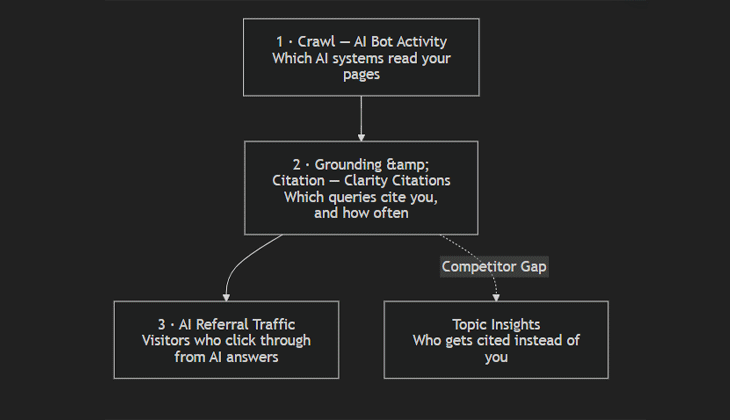
Which AI systems read your pages”] –> B[“2 · Grounding & Citation — Clarity Citations
Which queries cite you, and how often”] B –> C[“3 · AI Referral Traffic
Visitors who click through from AI answers”] B -. “Competitor Gap” .-> D[“Topic Insights
Who gets cited instead of you”]
Copilot AI Session Summaries Catch UX Friction Faster
Since 2025, Clarity attaches an auto-generated Copilot summary to every session recording. Instead of scrubbing through minutes of video, you get the traffic source, the key actions taken, and anomalies like rage clicks, dead clicks, and JavaScript errors in a few sentences.
The SEO tie-in is indirect but real. Rage clicks and dead clicks are leading indicators of the friction that pushes people back to the search results. Fixing them faster means fewer bounces and more engaged sessions, the kind of signals Google’s helpful-content systems reward. It is important not to overstate this: Clarity does not directly change your ranking, and engagement is not a confirmed ranking factor. What it does is shorten the time between “something is wrong” and “it is fixed,” which is the practical work behind every useful-content strategy.
AI Bot Activity Shows Which AI Systems Crawl You (and When)
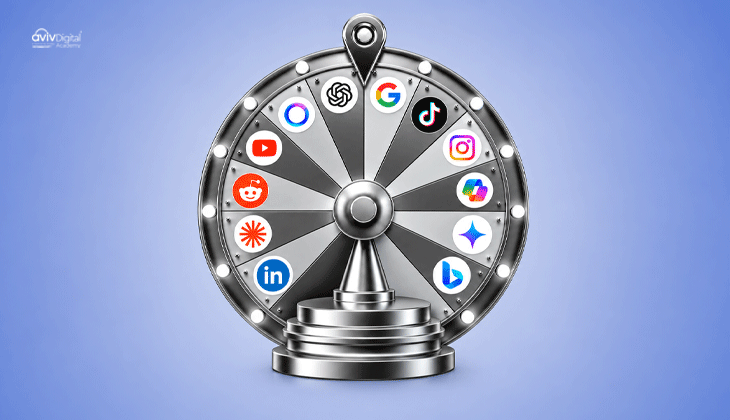
Launched in January 2026, the AI bot activity dashboard shows which AI systems crawl your site, how often, and which pages they read. You can see ChatGPT, Claude, Gemini, Copilot, and Perplexity activity separately.
Think of this as funnel stage one. Before an AI can cite you, it has to crawl and index your content. Crawling is necessary but not sufficient for a citation. A spike in bot activity on a page does not mean the page is about to be recommended. It means the page is on the radar. That distinction matters, because it stops teams from celebrating a crawl spike as if it were a citation.
The practical use is trend-watching. If AI crawler visits to a key page drop week over week, something may be blocking access, such as a robots rule, a slow render, or a redirect. Catching that early protects the top of your AI funnel before citation gaps even appear.
Clarity Citations: Measure AEO and GEO Visibility for Free
This is the most consequential feature in the 2026 release. Clarity Citations reached general availability on May 13, 2026, and it is free with no traffic cap. Setup uses the standard Clarity tracking code plus domain verification through Bing Webmaster Tools or Google Search Console.
The dashboard reports page-level citations, share of authority, AI referral traffic, grounding queries, cited pages, and trendlines. In plain terms, it answers the question most teams could not answer before: which AI assistants cited my content, for which queries, and how often. Only 16% of brands systematically track their AI search performance, according to McKinsey research cited in Writer’s enterprise guide, which means most teams are still flying blind on this.
One caveat keeps the feature honest. Clarity Citations primarily reports citations on Microsoft AI surfaces, like Copilot and Bing, not ChatGPT, Gemini, or Perplexity directly. It is the first free, native window into the citation layer, but it is not a complete view of every answer engine. Treat it as your closest measurable proxy, and pair it with your own prompt-based checks for the other assistants.
There is also a real business reason to care. In Microsoft’s November 2025 study of 1,277 domains, AI referrals converted at 1.66% for sign-ups versus 0.15% from organic search, roughly an 11x differential. AI traffic is still a small share of total volume, but it arrives with far higher intent. That is the strongest argument for instrumenting the citation layer now, while the channel is still young and less crowded.
If you are new to how AI citations differ from classic rankings, our breakdown of AI SEO vs traditional SEO covers the shift in plain terms.
Topic Insights: Benchmark Your AI Visibility Against Competitors
Topic Insights flips the camera outward. You define a topic, write representative prompts, and name your competitors. Clarity then evaluates the generated AI answers, identifies which domains and pages get cited, and scores your visibility, influence, competition, and opportunity.
For a marketing team, this answers two questions that used to require manual prompt testing: does my brand show up for the questions buyers ask before choosing a product, and which competitor keeps getting cited instead of me?
Use it before a content sprint, not after. If a competitor owns the citation for “which digital marketing course in Calicut is right for beginners,” you now know the exact query gap to build content around, rather than guessing at topics. That turns Topic Insights from a report into a content brief generator.
Turning Microsoft Clarity Data into Ranking Action
Every feature above maps to a specific action. Here is the checklist that turns dashboards into decisions:
- Fix rage-click elements first: Let Copilot session summaries identify the buttons, forms, and links users repeatedly click or tap. Fix the top offenders before addressing anything else.
- Check AI Bot Activity weekly: A drop in crawling can be an early warning sign. Investigate robots.txt rules, rendering delays, and redirects on any page that loses AI-driven traffic.
- Monitor Citations for query gaps: When Clarity reveals grounding queries that produce no citation, treat them as content opportunities. Create a page that directly and clearly answers the ungrounded query.
- Run Topic Insights before each content sprint: Identify prompts where competitors are cited more frequently than you are, then refresh or create the pages best positioned to answer those queries.
- Keep the technical foundation clean: AI crawlers need to access and render your pages effectively, so page speed, crawlability, and indexability influence what they can retrieve. Our technical SEO guide covers the fundamentals.
Here is the same mapping as a quick-reference table:
| Clarity AI feature | What it tells you | The action it drives |
| Copilot session summaries | Which elements cause rage clicks, dead clicks, JS errors | Fix the top friction points first |
| AI Bot Activity | Which AI crawlers read you, and when | Watch for crawl drops; fix robots and render issues |
| Citations | Which queries cite you, and how often | Close grounding-query gaps with new content |
| Topic Insights | Which competitors get cited instead of you | Target their citation gaps before a content sprint |
Close with the honest caveat. Clarity’s AI features report visibility and behavior; they do not guarantee rankings or citations by themselves. A dashboard can tell you that a competitor is being cited instead of you, but it cannot write the content that closes the gap. Treat clarity as a diagnostic layer, not a silver bullet.
Conclusion
The AI era did not retire the old SEO skills; it added a new measurement layer on top of them. You still need pages that load quickly, answer the query directly, and earn links. What changed is that “Did anyone see my content?” now has two answers: one from the classic search results, and one from whatever ChatGPT, Copilot, or Gemini decides to cite.
Microsoft Clarity is the first free dashboard that shows both. Copilot session summaries shorten the distance between a UX problem and its fix. AI Bot Activity tells you which answer engines are reading you. Citations close the “Was I cited?” blind spot most teams still carry, and Topic Insights turns a competitor’s citation win into your next content brief. None of these features guarantees a ranking, and none of them writes the content for you.
The realistic takeaway is smaller but more useful. In a search environment where the top result can lose more than half its clicks to an AI answer, visibility you cannot measure is visibility you cannot protect. Clarity gives you the measurement for free. The action that follows it, fixing friction, answering ungrounded queries, and closing competitor citation gaps, is still yours to do. Teams that treat clarity as a diagnostic layer rather than a silver bullet are the ones who keep showing up in the answers that matter.
Want to turn AI-visibility tracking into a repeatable skill? Our digital marketing course teaches behavioral analytics, SEO, and answer-engine optimization as a connected workflow, with classroom options in Calicut and Kochi
Aviv Digital Academy is one of the leading Digital Marketing Course in Kerala. We offer a wide variety of globally recognized certification programs that include SEO, SEM, SMM, Email Marketing, and Inbound Marketing courses. For more details, Contact Us at: +91 8156998844
FAQ
Is Microsoft Clarity really free?
Yes. Microsoft Clarity has no paid tier, no traffic caps, and no locked features. Heatmaps, session recordings, AI insights, and citations are all included, and the official site labels the product “free forever.” Re-verify this at publish time in case Microsoft changes tiering, but as of 2026, the entire platform remains free.
Does Microsoft Clarity replace Google Analytics?
No. Clarity is behavioral and UX analytics, showing heatmaps, session recordings, and friction signals. Google Analytics 4 covers acquisition, attribution, and conversions. They are complementary, and Clarity integrates with GA4 so you can view both datasets together rather than choosing one.
How does Clarity help with AEO and GEO specifically?
Through the Citations dashboard, which tracks AI-assistant citations by query, and Topic Insights, which benchmarks your brand’s visibility in AI-generated answers against competitors. These are the two features that turn answer-engine optimization from a guessing game into something you can measure.
Does Clarity data directly affect Google rankings?
Not directly. Clarity is not a ranking factor. But the UX signals it surfaces, such as rage clicks, dead clicks, and bounce triggers, correlate with the engagement signals Google’s helpful-content systems reward. Fixing that friction supports rankings indirectly; avoid claiming a direct causal link.
What is the AI Bot Activity dashboard?
Launched in January 2026, it shows which AI crawlers, including ChatGPT, Claude, Gemini, Copilot, and Perplexity, visit your site, how often, and which pages they read. It is an upstream signal: crawling happens before citation, so this dashboard lets you catch access problems before citation gaps appear.