Technical SEO is the foundation of any successful search engine optimization strategy. While content quality and backlinks matter, they mean nothing if search engines can’t crawl, index, and understand your website. According to recent studies, 43% of websites have critical Technical SEO issues that prevent proper indexing. Many business owners and marketing professionals focus primarily on creating great content and building backlinks, but they overlook the technical infrastructure that makes these efforts visible to search engines. This oversight can be costly. A website with mediocre content but excellent technical SEO fundamentals will often outrank a competitor with superior content but poor technical optimization. In this comprehensive guide, we’ll break down technical SEO, explain why it matters for your business, and provide you with a complete checklist to audit and optimize your website for maximum search engine visibility.
What Is Technical SEO?
Technical SEO refers to the optimization of website infrastructure and backend elements to help search engines crawl, index, and rank your content more effectively. Unlike on-page SEO (which focuses on content and keywords) and off-page SEO (which focuses on backlinks), technical SEO deals with the technical aspects of your website that exist beyond the visible content. Think of technical SEO as the plumbing and electrical systems of a building. Just as a beautifully designed house means nothing without working pipes and electricity, impressive content means little if search engines can’t properly access and understand it.
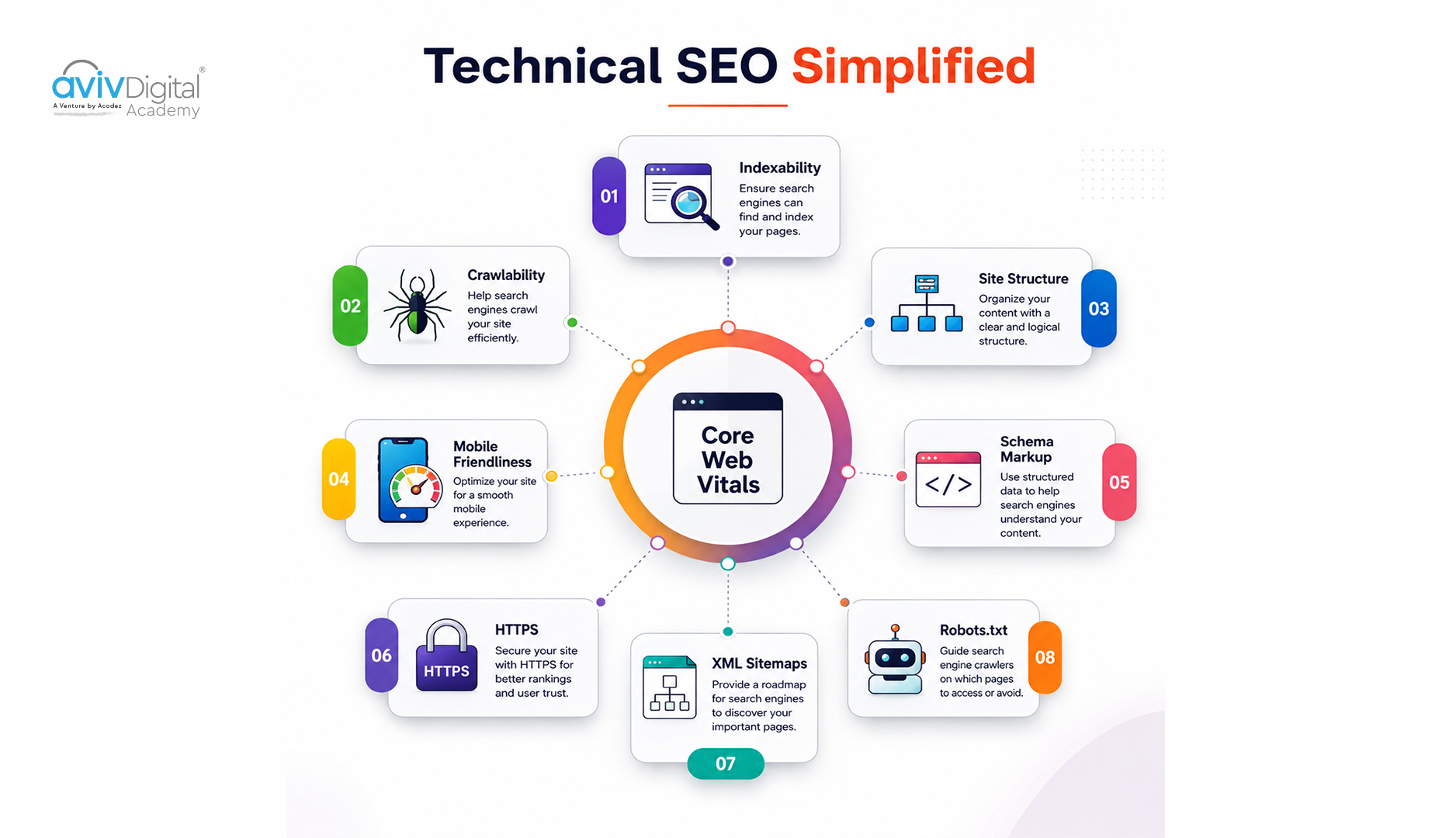
Key areas of technical SEO include:
- Site Speed & Performance: Page load times and Core Web Vitals that affect user experience and rankings
- Mobile Optimization: Responsive design and mobile-first indexing implementation
- Crawlability: Allowing search engines to access and crawl your pages without barriers
- Indexation: Ensuring your pages are discovered and indexed in search results
- Structured Data: Markup that helps search engines understand content context
- Site Architecture: URL structure, internal linking patterns, and information hierarchy
- Security: HTTPS implementation and overall website security measures
Why Technical SEO Matters
Search Engine Accessibility
Search engines use automated crawlers (also called bots or spiders) to discover and index your website. If your site has technical issues, these crawlers may be unable to access your content, resulting in poor indexation and significantly lower rankings. Consider a scenario where your website uses JavaScript-heavy navigation that search engines struggle to render. If 40% of your pages are effectively invisible to Google’s crawler because they require JavaScript interaction to discover, you’ve just lost 40% of your potential search visibility. This is a technical issue that no amount of great content can overcome. Additionally, crawlers have limited resources. They spend a finite amount of time crawling your site each day. If your site architecture forces crawlers to waste this “crawl budget” on duplicate pages, thin pages, or dead ends, you’re reducing the number of quality pages that get indexed.
User Experience Signals
Google’s Core Web Vitals now directly impact rankings. A slow website with poor usability will rank lower than a fast, optimized competitor, even with similar content quality. Google has made it clear that user experience is a primary ranking factor. When a user lands on your page, they expect it to load quickly and respond immediately to their interactions. If your page takes 10 seconds to load or becomes unresponsive while they’re trying to click a button, they’ll likely bounce to a competitor’s site. This signals to Google that your page doesn’t provide a good user experience, and your rankings suffer as a result. Moreover, page speed affects not just rankings but also conversion rates. Studies show that every additional second of load time can reduce conversion rates by up to 7%. So a technically optimized website isn’t just better for SEO; it’s better for your bottom line.
Competitive Advantage
Most websites ignore technical SEO or implement it poorly. By fixing technical issues while your competitors remain oblivious, you’ll gain a significant advantage and improve your organic visibility. Many businesses focus exclusively on content and backlinks, leaving low-hanging technical optimization opportunities on the table. For example, if you implement proper structured data markup while competitors don’t, you might earn rich snippets in search results, which can significantly increase click-through rates. If you optimize your Core Web Vitals while competitors have slow websites, you’ll rank higher for competitive keywords.
Organic Traffic Growth
Proper technical optimization can increase organic traffic by 20-50% without creating new content, according to industry benchmarks. This is because you’re making your existing content more discoverable, crawlable, and indexable. We’ve seen clients gain 60-100% organic traffic increases purely from technical SEO improvements like fixing crawl errors, implementing proper redirects, optimizing site speed, and adding structured data. These aren’t new pages or new links, just better technical implementation.
Site Speed & Performance: The Foundation of Modern SEO
Page speed has become non-negotiable for SEO success. Google’s Core Web Vitals metrics measure specific aspects of user experience: how quickly content loads, how responsive the page is, and how stable the layout is.
Understanding Core Web Vitals
Largest Contentful Paint (LCP) measures how long it takes for the main content of a page to load. Google wants to see LCP occur within 2.5 seconds. If your page takes 10 seconds for the main content to appear, visitors will be frustrated and likely bounce away. First Input Delay (FID) measures how quickly the page responds to user interactions like clicks and keyboard input. The ideal threshold is under 100 milliseconds. If a user clicks your navigation menu and waits 500 milliseconds for it to respond, that’s a poor experience. Cumulative Layout Shift (CLS) measures unexpected layout changes while the page is loading. For example, if your page loads with the main content at the top and then suddenly shifts down as ads load, that’s a poor experience. You want CLS under 0.1.
Practical Speed Optimization
Optimizing page speed involves multiple strategies. Enable GZIP compression on your server to reduce file sizes transmitted to users. Minimize and compress CSS, JavaScript, and HTML files to remove unnecessary code. Implement lazy loading for images and videos so they only load when the user scrolls to them, not when the page first loads. Use a Content Delivery Network (CDN) to serve static assets from servers geographically closer to your users. Optimize and compress images aggressively; this alone often improves page speed by 1-2 seconds. Remove render-blocking JavaScript and CSS that prevent the browser from displaying content until these files fully load. Implement browser caching with proper cache headers so repeat visitors don’t need to re-download unchanged files. This dramatically improves speed for returning users. Use async or defer attributes on script tags so they don’t block page rendering while loading.
Mobile Optimization in a Mobile-First World
Google now uses mobile-first indexing, meaning it primarily crawls and indexes the mobile version of your website for ranking. This is a fundamental shift that prioritizes mobile experience above all else.
Responsive Design Implementation
Implement a responsive design that automatically adapts to different screen sizes and devices. This isn’t optional; it’s required for ranking in Google. Test your design thoroughly in Google Search Console’s mobile usability tools to identify any mobile-specific issues. Ensure buttons and links are touch-friendly with a minimum 48×48 pixel touch target. Fingers are larger than mouse cursors, so the spacing needs to reflect this reality. Avoid intrusive interstitials (pop-ups that block content) that frustrate mobile users. Ensure readable font sizes (minimum 16px) that don’t require zooming. Text that’s too small forces users to zoom in, which degrades the experience. Avoid Flash and plugins incompatible with mobile devices.
Test thoroughly on multiple mobile devices and browsers because mobile experiences vary significantly across devices. A page that works perfectly on an iPhone 15 might have issues on older Android devices. Verify the viewport meta tag is properly configured to ensure the page renders correctly on mobile: <meta name=”viewport” content=”width=device-width, initial-scale=1″>
Crawlability & Indexation: Getting Your Pages Discovered
For search engines to rank your pages, they must first discover and index them. This requires proper crawlability configuration.
XML Sitemaps and Discovery
Create an XML sitemap listing all important URLs on your website, then submit it to Google Search Console. An XML sitemap acts as a roadmap for search engines, helping them discover pages they might otherwise miss. Include all important pages in your sitemap, but exclude thin, low-value pages, login pages, and admin areas. Use robots.txt strategically to control crawler access. Block low-value pages such as login screens, duplicate-content pages, and admin sections. Conversely, ensure crawlers can access important resources like images and CSS/JavaScript files that are critical for rendering your pages. Check Google Search Console regularly for crawl errors. Errors like 404 pages, server errors, or accessibility issues prevent proper indexation. Fix these systematically.
Duplicate Content and Canonicalization
Duplicate content is a common issue that dilutes your SEO authority. When the same content exists at multiple URLs, search engines must decide which version to index and rank. Use canonical tags to tell search engines which version is the “official” one.
For example, if your website can be accessed as both example.com and www.example.com, use canonical tags to indicate that www.example.com is the preferred version. This consolidates all ranking authority on that single URL.
Redirect Strategy
Implement proper redirect chains; prefer direct 301 redirects rather than chains of redirects. If URL A redirects to URL B, which redirects to URL C, you’re wasting crawl budget and delaying user page loads. Go directly from A to C when possible. Fix 404 errors and broken internal links systematically. These waste crawl budget and hurt user experience. Use the search console to identify pages getting 404 errors, then either fix the URLs or implement proper redirects.
Check for orphan pages, pages not linked from any other pages on your site. Search engines may not discover these pages if you don’t link to them or include them in your sitemap. Use descriptive anchor text for internal links so search engines understand the relationship between pages.
Structured Data & Schema Markup: Teaching Search Engines About Your Content
Structured data markup (schema markup) tells search engines what your content is about, enabling richer search results and better visibility.
Schema Implementation Strategy
Implement Schema.org markup for your specific content type. Add the Organization schema to your homepage to help Google understand your business. Use Article schema for blog posts, Product Schema for e-commerce items, and Local Business schema if you have a physical location.
Test structured data using Google’s Rich Results Test to validate that your markup is correct and will produce rich snippets in search results. Implement the JSON-LD format (the recommended approach) rather than Microdata or RDFa, as it’s easier to implement and maintain.
Add a breadcrumb schema for navigation hierarchy to help search engines understand your site structure and appear in search results breadcrumbs. Include Review schema if you have ratings or reviews. Implement the FAQPage schema for FAQ sections to potentially earn featured snippets.
Structured data doesn’t directly improve rankings, but it can significantly improve click-through rates by making your search results more prominent and detailed. Rich snippets stand out in search results and attract more clicks than plain text results.
Site Architecture & URL Structure: Building for Both Humans and Crawlers
Your website’s architecture and URL structure affect how search engines understand your content organization and how users navigate your site.
URL Best Practices
Use descriptive, keyword-rich URLs that indicate the content topic. A URL like /what-is-technical-seo is far more valuable than /page123. Keep URL structure logical and hierarchical so search engines understand relationships between pages. Use hyphens (not underscores) to separate words in URLs.
Keep URLs short and memorable for users, but don’t sacrifice clarity. Avoid excessive parameters and session IDs in URLs as these create duplicate content and confuse search engines. Use lowercase URLs consistently for standardization and ease of sharing.
Implement proper URL trailing slash consistency; decide whether your site uses trailing slashes and apply this consistently across all pages. Avoid deep URL structures deeper than 3 levels where possible, as this makes pages harder to discover and less relevant.
Information Architecture
Create a clear site hierarchy with logical categories and subcategories. This helps both users and search engines understand your content organization. Implement breadcrumb navigation to reinforce the site hierarchy and improve user experience.
Ensure your internal linking structure supports proper crawling. Important pages should be linked from multiple places and be reachable in 3 clicks or fewer from the homepage. This maximizes crawl efficiency and distributes authority throughout your site.
Security & HTTPS: A Ranking Factor and Trust Signal
HTTPS (SSL/TLS encryption) is now a confirmed ranking factor. Google prefers secure websites, and users trust them more. Non-HTTPS websites may show warning messages in browsers, scaring away visitors.
Implementation Steps
Implement an SSL certificate and use HTTPS across your entire website. Choose certificates from trusted providers like Let’s Encrypt (free) or major commercial certificate authorities. Redirect all HTTP traffic to HTTPS using 301 redirects to preserve SEO value.
Update internal links and resources to use HTTPS to avoid mixed content warnings (HTTP resources served on HTTPS pages). Fix any mixed content issues in your browser console.
Add your HTTPS version to Google Search Console as a separate property so you can track its performance separately from any HTTP version. Update external links and references to use HTTPS where applicable, though old HTTP links still pass some value through the redirect.
Implement security headers like Content Security Policy (CSP) and X-Frame-Options to improve security. These don’t directly affect rankings but indicate a well-managed, professional website.
Real-World Example: Complete Technical SEO Transformation
Consider a typical e-commerce site that implemented comprehensive technical SEO:
Before Optimization: The site had a 15+ second page load time with slow image delivery and unoptimized CSS. There was no structured data markup, so products appeared as plain text in search results rather than rich product results. The mobile optimization score was just 28/100, with intrusive pop-ups blocking mobile content. Google Search Console reported 350+ crawl errors from broken redirects and missing pages. There was no XML sitemap, so many pages weren’t being discovered.
Improvements Implemented: The team implemented image compression and set up a CDN, reducing load time to 2 seconds. They added Product and Organization schema markup, enabling rich product snippets in search results. Mobile responsiveness was improved, raising the mobile score to 92/100. Crawl errors were systematically fixed, and a proper XML sitemap was created and submitted.
Results (3 months later): Organic traffic increased 156%. Average ranking position improved from #45 to #12 for target keywords. Click-through rate increased 89% due to rich snippets. Conversion rate improved 34% because the site was faster and more mobile-friendly.
These results came purely from technical SEO, no new content, and no new backlinks. They simply removed barriers that prevented the site from ranking effectively.
Common Technical SEO Mistakes to Avoid
- Ignoring Core Web Vitals: Poor page speed directly impacts rankings. If you don’t measure and improve your Core Web Vitals, you’re leaving rankings on the table.
- No Mobile Optimization: With mobile-first indexing, mobile experience is paramount. A site that works on desktop but is broken on mobile will suffer in rankings.
- Duplicate Content Without Canonicals: Multiple versions of the same content confuse search engines and dilute authority. Always use canonical tags.
- Broken Internal Links: Wasting crawl budget on broken links and 404 pages reduces the number of quality pages that get crawled and indexed.
- Blocking Important Resources: If you block CSS, JavaScript, or image files in robots.txt, search engines can’t properly render your pages.
- Poor URL Structure: Complex, parameter-heavy URLs harm both crawlability and user experience.
- Missing Structured Data: You’re missing opportunities for rich snippets that improve click-through rates.
- Inadequate XML Sitemap: Ensure all pages are discoverable by maintaining a comprehensive sitemap.
- Redirect Chains: Chains of redirects waste crawl budget and slow down page delivery.
- Ignoring HTTPS: Security is now a ranking factor. HTTPS websites get slight ranking boosts.
Tools for Technical SEO Auditing
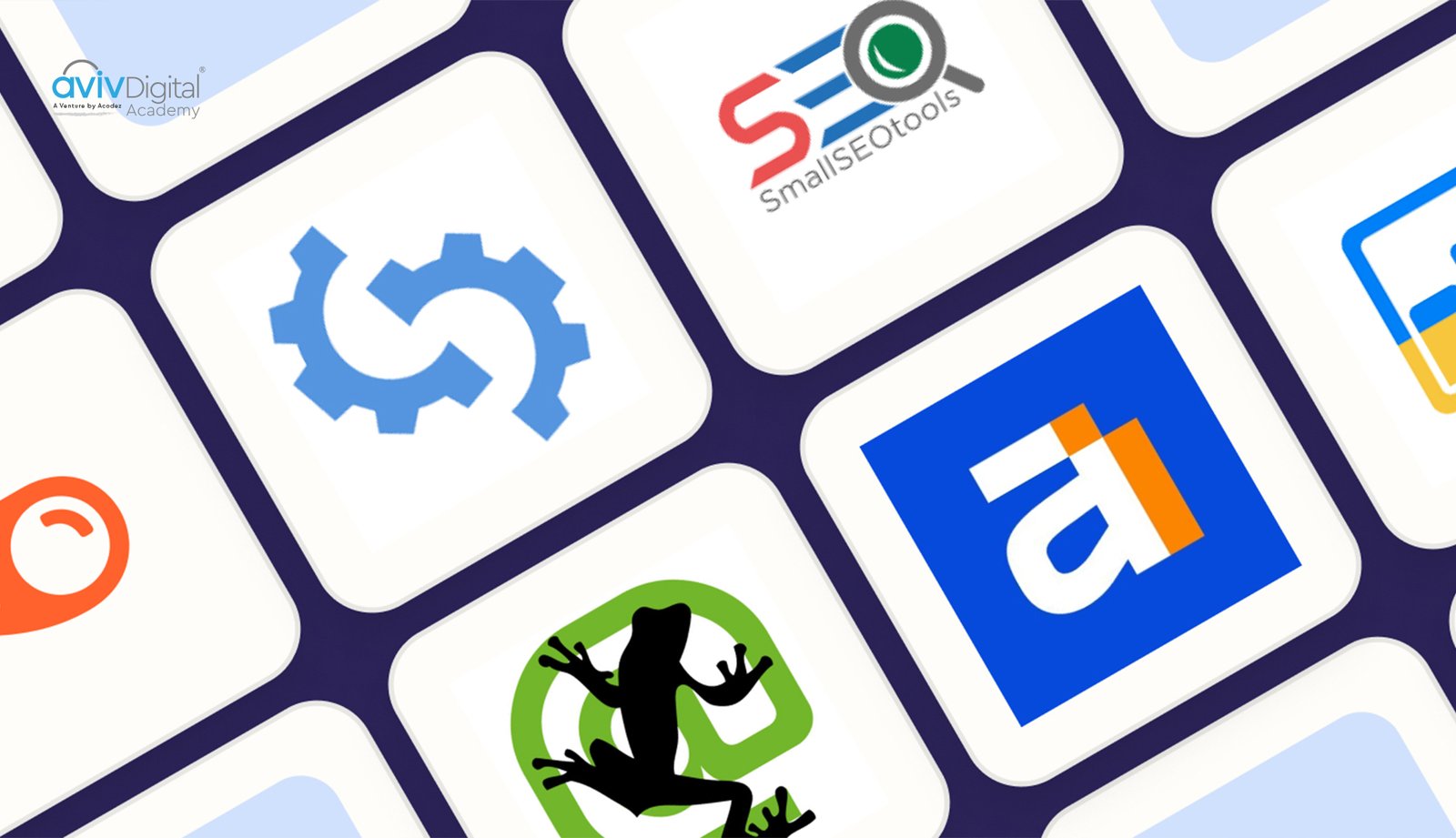
| Free Technical SEO Tools | Paid Technical SEO Tools |
|---|---|
| Google Search Console – Provides crawl stats, indexation reports, and mobile usability insights. | Semrush Technical SEO Audit – Offers comprehensive site analysis with actionable technical SEO recommendations. |
| Google PageSpeed Insights – Measures Core Web Vitals and provides performance optimization suggestions. | Ahrefs Site Audit – Detects technical SEO issues and highlights optimization opportunities. |
| Google Mobile-Friendly Test – Identifies mobile usability and responsiveness issues. | Moz Pro Site Crawl – Monitors technical SEO health and tracks issues over time. |
| Google Structured Data Testing Tool – Validates schema markup and structured data implementation. | Botify – Provides enterprise-grade crawl analytics and technical SEO insights for large websites. |
| Screaming Frog SEO Spider (Free Version) – Crawls websites to identify broken links, redirects, duplicate content, and other technical issues (limited to 500 URLs). | DeepCrawl (Lumar) – Delivers advanced website crawling, technical analysis, and continuous monitoring for enterprise sites. |
Technical SEO Across Different Platforms
| SEO Area | WordPress | E-commerce (Shopify/WooCommerce) | Single-Page Applications (React, Vue, Angular) |
|---|---|---|---|
| SEO Setup | Use Yoast SEO or All in One SEO to manage meta tags, XML sitemaps, and schema. | Implement product schema and optimize category pages. | Implement Server-Side Rendering (SSR) or Static Site Generation (SSG). |
| URL Structure | Enable SEO-friendly (pretty) permalinks and configure proper redirects. | Use canonical tags for product variations and filtered URLs. | Ensure crawlable, indexable URLs with proper routing. |
| Performance | Optimize the database, enable caching, and monitor plugin conflicts. | Improve product page speed for better rankings and conversions. | Optimize JavaScript execution and prerender key pages. |
| Indexing | Submit XML sitemaps and monitor crawl issues in Google Search Console. | Create product-specific XML sitemaps and avoid duplicate content. | Test JavaScript rendering and indexing using Google Search Console. |
| Best Practice | Keep plugins updated and minimize unnecessary extensions. | Maintain a clean site structure and optimize faceted navigation. | Ensure dynamic pages generate accurate meta tags and structured data. |
Conclusion
Technical SEO is non-negotiable in modern digital marketing. By implementing comprehensive technical optimization, you ensure your website is properly crawlable, fast, secure, and optimized for search engines and users alike. Remember that technical SEO is an ongoing process. Search algorithms and ranking factors evolve constantly. Regular audits through Google Search Console, monitoring your Core Web Vitals, and staying updated with SEO best practices will keep your site performing at its best. Start with the quick wins: ensure HTTPS is implemented, create and submit an XML sitemap, and optimize your Core Web Vitals. These improvements often take days to implement, but can provide months of ranking improvements. Then tackle more complex improvements like structured data implementation, site architecture optimization, and JavaScript rendering optimization. Your organic traffic and conversion rates will thank you for the effort. Technical SEO isn’t glamorous, but it’s the difference between a website that ranks well and one that struggles in search results.
Aviv Digital Academy is one of the leading Digital Marketing Course in Calicut. We offer a wide variety of globally recognised certification programs that include SEO, SEM, SMM, Email Marketing, and Inbound Marketing courses. For more details, Contact Us at: +91 8156998844
FAQ
How long does technical SEO take to show results?
Results vary based on the severity of issues. Most improvements appear within 4-12 weeks after implementation. Core Web Vitals improvements might show ranking changes within 1-2 weeks. Site speed improvements provide immediate user experience benefits.
Is technical SEO more important than content?
No. Technical SEO and content are both essential. Technical SEO is the foundation that enables great content to rank effectively. Without technical optimization, even excellent content struggles to rank.
How often should I audit my site for technical issues?
Monthly audits are recommended. Use Google Search Console for ongoing monitoring and conduct comprehensive audits quarterly.
What’s the difference between crawlability and indexation?
Crawlability refers to whether search engines can access your pages. Indexation refers to whether they actually add your pages to their search index. A page must be crawlable to be indexed, but crawlability doesn’t guarantee indexation.
How important is page speed for SEO?
Very important. Google’s Core Web Vitals are official ranking factors. Pages with slow load times rank lower than faster competitors with similar content.