The best Claude Code skills for digital marketers are the ones that take over work you repeat every week: site audits, campaign reports, content briefs, and ad copy. A skill is a saved set of instructions that Claude follows whenever a task matches, so you stop re-explaining your process in every chat.
This guide explains what Claude Skills are and why marketers use them. It then walks through seven skills worth building, with a free download for each. You will also get a real SKILL.md file to copy, simple install steps, and a table that matches skills to channels.
What Are Claude Skills?
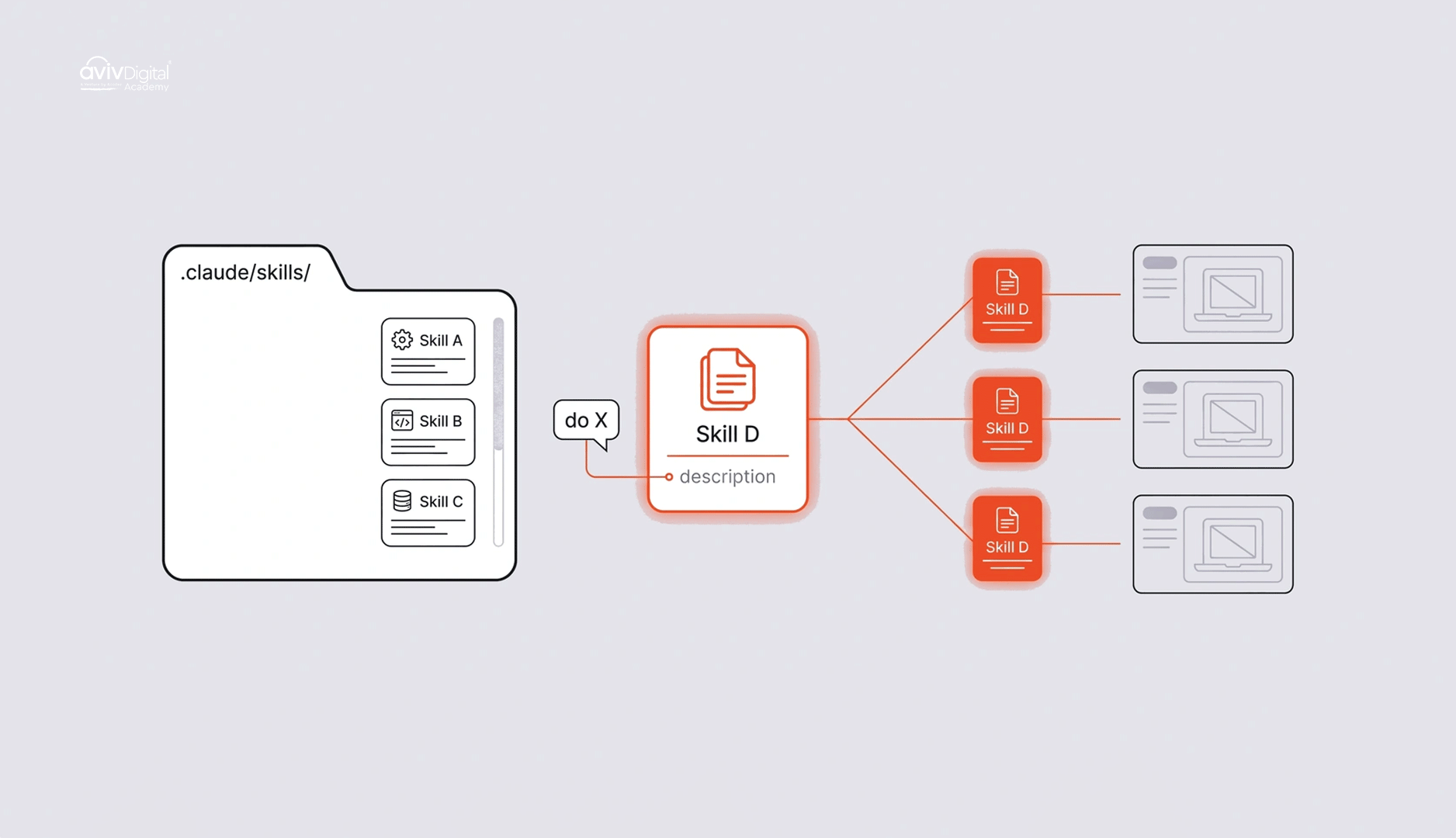
Claude Skills are reusable folders of instructions that Claude loads when a task matches. Each folder holds one required file called SKILL.md. It can also hold templates, examples, and scripts.
The idea is simple. Claude reads only the short description at the top of each skill. When your request matches that description, it loads the full instructions and follows them. Otherwise, the skill stays out of the way, so a long checklist costs almost nothing until you need it.
Where skills live in Claude Code
Claude Code is Anthropic’s tool for working with Claude from your terminal or code editor. It keeps skills in two places:
~/.claude/skills/for personal skills available in all your projects.claude/skills/inside a project folder, for skills that only apply to that project
A typical skill folder looks like this:
.claude/skills/
└── seo-audit/
    ├── SKILL.md
    └── templates/
        └── fix-list-template.md
How a skill differs from a prompt or a Project
A normal prompt lasts for one chat. A Project in Claude.ai keeps background files and instructions for a body of work, and Claude reads them every time you chat inside it. A skill is a procedure that Claude picks up only when the task fits, and you can reuse it anywhere you install it. If you keep pasting the same checklist into chats, that checklist wants to be a skill.
Why Use Claude Skills? (What They Are Used For)
Marketers use skills to make repeat work faster and more consistent. Here is what that looks like in practice:
- Consistency: The same brand voice, format, and checklist every time, no matter who runs the task.
- Speed: You stop re-explaining your process. “Audit this page” is enough.
- Scale: Skills handle bulk jobs such as hundreds of meta descriptions or product listings.
- Team sharing: One person builds the skill, and the whole team uses it.
- Quality control: A built-in checklist catches the mistakes people make when they are rushed.
An honest note: you do not need Claude Code for everything. Regular Claude at claude.ai supports skills too, and it can handle many of the tasks below. Claude Code earns its place when you work with files on your computer, such as CSV exports, folders of pages, or HTML files.
Skills also do not replace marketing judgment. They speed up the routine part so you can spend more time on strategy, which is the same point we make in Will AI Replace Digital Marketers?
7 Best Claude Code Skills for Digital Marketers
Each skill below follows the same pattern: what it does, what is inside, and who it suits best. Every download is a zip containing one folder with an and any templates it needs. Installation steps are in the next section.
1. SEO Site Audit Skill
What it does: It checks a page or a set of pages against the basics of on-page and technical SEO. Then it produces a fix list ordered by importance, so you know what to repair first.
What’s inside: Checks for title tags, meta descriptions, heading structure, canonical tags, broken links, image alt text, and schema markup. It also has a template for the prioritized fix list.
Best for: SEO. It pairs well with our guide to technical SEO.
2. Campaign Data Analysis Skill
What it does: It reads CSV exports from GA4, Google Ads, Meta, or your email platform. It flags anomalies, calculates CTR, CPA, and ROAS, and writes a plain-language summary.
What’s inside: Formulas for each metric, rules for what counts as an anomaly, and a summary template. The instructions tell Claude to show its calculations so you can check them.
Best for: Paid ads, analytics, and reporting.
3. Brand Voice and Content QA Skill
What it does: It holds your tone, banned words, and style rules, then reviews or rewrites any draft against them. It is the quickest way to make AI-assisted writing sound like your brand and not like everyone else’s.
What’s inside: A voice guide with examples of “sounds like us” and “does not sound like us,” a banned-word list, and a short review checklist.
Best for: Social media, SEO content, and email.
4. Content Brief Generator Skill
What it does: You give it a target keyword and it returns a brief in your exact template. That includes search intent, an outline, FAQs, internal link ideas, and competitor gaps.
What’s inside: Your brief template, a step-by-step research routine, and rules such as “never invent a statistic” and “only suggest internal links from the list provided.”
Best for: SEO and content teams. See the sample file below.
5. Bulk Content and Ad Copy Generator Skill
What it does: It takes a spreadsheet of products, locations, or audiences and writes ad variations, meta tags, or descriptions for each row. It respects character limits, which is where hand-made bulk copy usually goes wrong.
What’s inside: Character limits for common formats, such as Google Ads headlines and meta descriptions. It also holds a tone guide and an output table that you can paste straight back into a sheet.
Best for: Paid ads, e-commerce SEO, and social repurposing, where one piece becomes many posts.
6. Landing Page Builder and CRO Skill
What it does: It builds or edits an HTML landing page from a short brief, then runs a conversion checklist over the result.
What’s inside: A page structure template and a checklist covering headline clarity, call-to-action placement, form length, and mobile layout. If you plan to test the changes, our guide to A/B testing explains how.
Best for: Paid ads and conversion work.
7. Reporting Automation Skill
What it does: It turns raw monthly data into your standard client or executive report, with the same sections every time: results, insights and next steps.
What’s inside: A report template, wording rules (for example, “explain every drop and every spike in one sentence”), and a checklist so no section is skipped.
Best for: Analytics, reporting, and agency client work.
| Skill Name | Download Link |
|---|---|
| SEO Audit Skill | seo-audit-skill.zip |
| Campaign Data Analysis | campaign-analysis-skill.zip |
| Brand Voice and Content QA | brand-voice-skill.zip |
| Content Brief Generator | content-brief-skill.zip |
| Bulk Content and Ad Copy | bulk-ad-copy-skill.zip |
| Landing Page Builder and Conversion Rate Optimization (CRO) | landing-page-cro-skill.zip |
| Reporting Automation | reporting-skill.zip |
A real SKILL.md example you can copy
This is a short version of the content brief skill. Save it as content-brief/SKILL.md.
---
name: content-brief
description: Creates an SEO content brief from a target keyword. Use when the user asks for a content brief, article outline or blog plan.
---

# Content brief generator

When given a target keyword, produce a brief with these sections:

1. **Search intent:** informational, commercial or transactional, in one sentence.
2. **Audience:** who is searching and what they already know.
3. **Outline:** one H1, 5 to 8 H2s, and key points under each.
4. **FAQs:** 4 to 6 questions people would ask.
5. **Internal links:** only from the list the user provides.
6. **Competitor gaps:** what top-ranking pages miss.

## Rules
- Never invent statistics, quotes or URLs.
- Keep the brief under 600 words.
- If the keyword is unclear, ask one question before starting.
The description line matters most. Claude uses it to decide when the skill applies, so say what the skill does and when to use it.
How to Install the Downloaded Skills
- Download and unzip the file. You should see a folder containing
SKILL.md. - Review it first. Open
SKILL.mdany scripts in a text editor. Skills can include code, so only install files you understand and trust. - In Claude Code, move the folder into
~/.claude/skills/to use it in every project. Use.claude/skills/inside a project to limit it to that project. - In Claude.ai, go to Customize > Skills, click the “+” button, choose Create skill, then Upload a skill, and pick the zip. Skills need code execution and file creation turned on, which you can find under Settings > Capabilities. Menu names change often, so check Anthropic’s guide to using skills in Claude for the current steps.
- Test it with a prompt such as “Run an SEO audit on this page.”
- Edit the
SKILL.mdto match your brand, tools, and reporting style. A skill that fits your workflow beats a generic one.
Summary: Which Skills Work Best for Each Channel
| Channel | Best skills |
|---|---|
| SEO | SEO site audit, content brief generator, brand voice and content QA |
| Social media | Brand voice and content QA, bulk content generator (repurposing one piece into many posts) |
| Paid ads | Bulk ad copy generator, campaign data analysis, landing page CRO |
| Analytics and reporting | Campaign data analysis, reporting automation |
- SEO: Start with the audit skill, then add the brief generator once you publish regularly. Our overview of AI SEO vs traditional SEO shows where AI help fits.
- Social media: Brand voice comes first. Without it, bulk posts all sound the same.
- Paid ads: The bulk copy skill saves the most time. Campaign analysis then tells you which variations to keep.
- Analytics and reporting: Build the analysis skill first and feed its output into the reporting skill.
Conclusion: Start With One Skill
Start with one skill, not all seven. Pick the task you repeat most, install that skill, and tweak it for a week. Once it saves you time, add the next.
Aviv Digital Academy is one of the leading Digital Marketing Course in Calicut. We offer a wide variety of globally recognized certification programs that include SEO, SEM, SMM, Email Marketing, and Inbound Marketing courses. For more details, Contact Us at: +91 8156998844
FAQs
What are Claude Skills in simple terms?
Claude Skills are saved instructions for a repeat task. Each one is a folder with a SKILL.md file, and Claude uses it when your request matches the skill’s description.
Do I need coding skills to use Claude Code skills?
No. A SKILL.md file is plain text written in everyday language. You need to be comfortable moving a folder on your computer and typing a few terminal commands in Claude Code. In claude.ai you upload a zip file instead.
Are Claude Skills free?
Anthropic’s support documentation says skills are available on the Free, Pro, Max, Ultra, Team and Enterprise plans, and need code execution to be enabled. Claude Code access and usage limits depend on your plan, so check Anthropic’s current plans page before you start.
What’s the difference between a Claude Skill and a Project?
A Project stores background files and instructions for ongoing work, and Claude reads them every time you chat in it. A skill is a procedure that Claude loads only when a task matches, and you can use it across chats and projects.